Amabilis Software    3D Canvas Community    3D Canvas Discussion Forums  Hop To Forum Categories  Rail Simulator    Rail Simulator Exports Available
Page 1 2 3 4 
Go
New
Find
Notify
Tools
Reply
  
-star Rating Rate It!  Login/Join 
Member
Picture of Amabilis Support
Posted
Hi All,

The Rail Simulator exports are now available in 3D Canvas 7.0.4.0 which can be downloaded here: Download 3D Canvas 7.0.4.0

I'll post more information on the export shortly.

Richard
 
Posts: 1412 | Registered: Thu November 06 2003Reply With QuoteEdit or Delete MessageReport This Post
Member
Picture of Frans
Posted Hide Post
Thanks Richard Wink
 
Posts: 122 | Location: Belgium ,Europe | Registered: Fri November 07 2003Reply With QuoteEdit or Delete MessageReport This Post
Member
Picture of Amabilis Support
Posted Hide Post
This export was an adventure, that's for sure. It was reasonably well documented, but specs are always open to interpretation.

I'm still not sure about a few things in the export. Currently, I've disabled distance levels. It seems that the specs say one thing, but the documentation says another. Basically, there is a naming convention that indicates if there is a distance level, but the file has a system for indicating distance levels also. I'm not sure yet, which actually works.

I'd like to ask the Rail Simulator folks about this, but honestly, experimentation will likely be faster. The folks at the publisher (FFG?) have been good, but Kuju has not. I don't really know what the history of Rail Simulator was, but it seems to have been complicated.
 
Posts: 1412 | Registered: Thu November 06 2003Reply With QuoteEdit or Delete MessageReport This Post
Member
Picture of Amabilis Support
Posted Hide Post
I have written and validated the animation export. But, I have no idea how to use it in the game. I'm 95% confident it is correct since I wrote an importer that validates it.

Actually, I know very little about how to get "stuff" into the game.
 
Posts: 1412 | Registered: Thu November 06 2003Reply With QuoteEdit or Delete MessageReport This Post
Member
Picture of Amabilis Support
Posted Hide Post
So, how do we use this exporter? I'm not exactly certain what to do with the resulting files, but the exporting is relatively simple.

To export a model to IGS format, click on an object in the "root" of the model, and then select "File->Export->Rail Simulator Intermediary Geometry Format (igs)".

Exporting an animation is equally simple. To export a model to IGS format, click on an object in the "root" of the model, and then select "File->Export->Rail Simulator Intermediary Animation Format (ia)". You can export all animations for the model by selecting the root, or select a sub-object to export for a branch of the model. (Actually, this is true of the geometry export as well)
 
Posts: 1412 | Registered: Thu November 06 2003Reply With QuoteEdit or Delete MessageReport This Post
Member
Picture of Amabilis Support
Posted Hide Post
How do we get the model and animation into Rail Simulator? That is something that well need to learn how to do. I don't really know quite yet.

What I do to test:

1) export to an appropriate folder under "C:\Program Files\Rail Simulator\Source\Developer\Addon"

2) use the "To ACE" tool to convert your textures and put them into the same folder as the export

3) find your exported file using Rail Simulator's "Asset Editor". It looks like a blue cube with wings.

4) Right click on the exported file and choose "New Shape Blueprint". Choose "Scenery blueprint"

5) Right click on the exported file (the blue cube with wings) and choose "Export"

6) Double-click on the blueprint file (looks like a beige cube), and choose "Preview" from the window on the right.

This message has been edited. Last edited by: Amabilis Support,
 
Posts: 1412 | Registered: Thu November 06 2003Reply With QuoteEdit or Delete MessageReport This Post
Member
Picture of Amabilis Support
Posted Hide Post
I'm not really sure how to use animation yet. I'm not certain that Rail Simulator uses interpolation of key frames. If it doesn't, then I'll have to pre-interpolate before exporting, which I don't do currently.

I have to do some experimentation with animation. All I've really done is exported, and validated my export.
 
Posts: 1412 | Registered: Thu November 06 2003Reply With QuoteEdit or Delete MessageReport This Post
Junior Member
Picture of Bremen
Posted Hide Post
Thank you Smile

My first import in RS is a small one arch bridge for my narrow gauge route... and here it is in RS Smile
This is only the beginning Wink
 
Posts: 85 | Registered: Fri November 17 2006Reply With QuoteEdit or Delete MessageReport This Post
Member
Picture of Amabilis Support
Posted Hide Post
Cool :-) Nice to see it worked. :-)
 
Posts: 1412 | Registered: Thu November 06 2003Reply With QuoteEdit or Delete MessageReport This Post
Member
Posted Hide Post


It seems to work, Richard, but have a slight size problem on the one model I've so far exported.
Could this be down to the fact I work in feet and inches?

Cheers,
Kevin
 
Posts: 184 | Registered: Fri November 07 2003Reply With QuoteEdit or Delete MessageReport This Post
Member
Picture of Frans
Posted Hide Post
Is there a limits of groups
I still got the message
 
Posts: 122 | Location: Belgium ,Europe | Registered: Fri November 07 2003Reply With QuoteEdit or Delete MessageReport This Post
Member
Posted Hide Post
There is still a limit of 24 groups, as far as I can see.
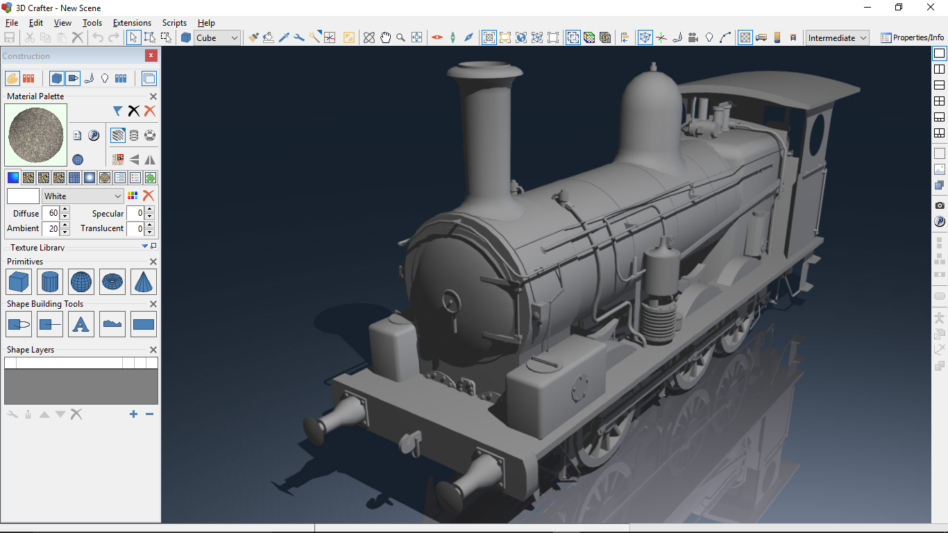
With help from Paul Gausden (who pointed out the reset animation plugin) I was easily able to rescale the loco in canvas and export it too the sim:-


Only been able to add the loco as scenery, so far. Not been able to work out how to make a working loco, yet.

Cheers,
Kevin
 
Posts: 184 | Registered: Fri November 07 2003Reply With QuoteEdit or Delete MessageReport This Post
Junior Member
Picture of Bremen
Posted Hide Post
I have found a strange behavior... exported a big bridge without problem... into the preview of asset editor is visible.. into the editor of RS is invisible Big Grin
This has to be an RS problem rather then a exporter problem Wink
 
Posts: 85 | Registered: Fri November 17 2006Reply With QuoteEdit or Delete MessageReport This Post
Member
Posted Hide Post
I've now managed to get the animation working with the loco (shown in previous post). There does seem to be a slight problem with the animation, in that it seems to halt for a fraction of a second on every revolution.
It could well be something I'm doing wrong, as there is no documentation for setting up locos, but thought I'd post here in case anybody else has noticed a similar problem.

Cheers,
Kevin
 
Posts: 184 | Registered: Fri November 07 2003Reply With QuoteEdit or Delete MessageReport This Post
Member
Picture of Amabilis Support
Posted Hide Post
This is going prety well. I'm pleased.

Kevm,

Yes, I forgot to do the translation from feet to meters in the export. I'll do that now.

I'm not sure about the animation. I'll have to look. Maybe it doesn't require the final key-frame to be the same as the first? It could be a number of things. I'm just happy that it "sort of" works, since I never managed to test the animation export in the sim itself.
 
Posts: 1412 | Registered: Thu November 06 2003Reply With QuoteEdit or Delete MessageReport This Post
Member
Picture of Amabilis Support
Posted Hide Post
I've updated the exporter and it will be available shortly (an hour).

I've added support for models in centimeters or feet, and proper texture placement (textures should be in a "textures" sub folder).
 
Posts: 1412 | Registered: Thu November 06 2003Reply With QuoteEdit or Delete MessageReport This Post
Member
Picture of Amabilis Support
Posted Hide Post
I've published the new version of 3D Canvas.

This version of the exporter requires that your ACE textures be located in a sub-folder "textures" as is the standard practice for Rail Simulator.

I still have to think about the "pause" in the animations. If anyone tracks anything down, let me know.
 
Posts: 1412 | Registered: Thu November 06 2003Reply With QuoteEdit or Delete MessageReport This Post
Member
Picture of Amabilis Support
Posted Hide Post
For those of you using feet/inches, there is an update to the exporters here: Updated Exporters
 
Posts: 1412 | Registered: Thu November 06 2003Reply With QuoteEdit or Delete MessageReport This Post
Member
Picture of Amabilis Support
Posted Hide Post
Oh... I forgot to mention... the 24 groups limitation is with Rail Simulator, not 3D Canvas.
 
Posts: 1412 | Registered: Thu November 06 2003Reply With QuoteEdit or Delete MessageReport This Post
Newcomer
Posted Hide Post
Hi.

I found this in the Animation section of document 4.07 Train Guidelines.

Wheels and bogies typically do not need any animation, as they are code driven. The
(main) wheels on a steam locomotive however do need to be animated, since a
whole array of pistons and rods rely on them. Animate them for a full 360 degrees
rotation of the wheel. The fail-safe way of going about this is to set their rotation
type to linear, have 17(!) keyframes (0 till 16) and create a key for each frame,
everytime rotating the wheel 22.5 degrees further. Once you have made 16 keys set
the out-of-range controller to “Relative Repeat”. The 17th frame (i.e. frame 16 when
starting at frame 0) will remain empty but is required for the exporter, otherwise a
jump may appear in the in-game animation.

Could be cause of jump?

Cheers

Aidan
 
Posts: 4 | Registered: Thu November 15 2007Reply With QuoteEdit or Delete MessageReport This Post
 Previous Topic | Next Topic powered by eve community Page 1 2 3 4  
 

Amabilis Software    3D Canvas Community    3D Canvas Discussion Forums  Hop To Forum Categories  Rail Simulator    Rail Simulator Exports Available

© Amabilis Software 2003-2007